Center for Excellence in Postal Technology is constantly making efforts to bring in comfort at Post offices in implementing various Departmental software.
The expectations of the customers are rapidly changing. To meet the changing requirements of the customers Department is making efforts to upgrade the existing products or introducing new products. This update takes care of all the upgrades and new products being introduced by the Department.
The most salient features of this update are
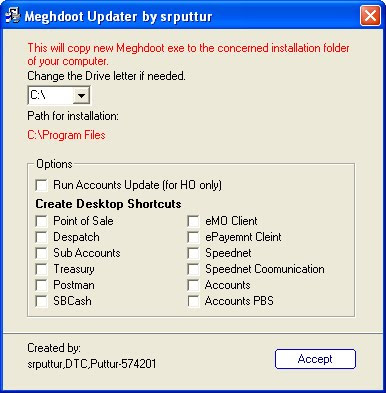
i). Customized installer for upgrading Meghdoot to update-3.
ii). Online acceptance of fee for entrance examination.
iii). Disabling booking of Registered letters without barcode.
iv). Offline booking of WNX articles.
v). e-Money order Compilation
vi). MNOP implementation in Rnet.
Detailed information is furnished below about each change implemented in the software.
General Manager,
Center for Excellence in Postal Technology,
Mysore.
Detailed information about each change implemented in the software
Reason for release: Update-3 to Meghdoot 7.0 is being released in order to implement major changes in most of the Meghdoot modules besides provision of some other minor changes and rectifying the erros/bugs brought to the notice of CEPT till now.
Who has to Upgrade: Update-3 has to be implemented by all the Computerized Post Offices in the Country.
Pre-requisite: Update-1 to Meghdoot version 7.0 released by CEPT on 05.12.2011.
Detailed Release document containing Installation procedure and the modifications done in each module is also available the release document. The Software containing UPDATE-3 TO MEGHDOOT 7.0 can be downloaded from 15.09.2012.
Module wise major modifications
| Module | Changes made to the Software | Improvement in Operations/Service |
| Point of Sale | Booking of Offline WNX Transactions | Hitherto, WNX server needs to be connected for every event of booking process. This offline booking reduces the transaction time at counter considerably. |
| VP booking facility for the Registered Newspaper | Booking of Registered Newspaper with VP facility is introduced, which was not available earlier. |
| PLI/RPLI validations prescribed by PLI Directorate, at the time of booking | Due to these validations, data mis-match between the NIC PLI data file and Meghdoot can be reduced considerably. |
| | |
| Despatch | Closing of more than one bag to the same destination in same despatch | Till now, only one bag can be closed in Despatch module to a particular destination Post Office in a single despatch. This is relaxed. |
|
Implementation of MNOP concept for the Rigistered Bags
| Post Offices can close bags only to the L1/L2 Mail Offices, as per the MNOP concept. |
|
| |
| Postman |
All Delivery related options for Speed Post Cash on Delivery articles. The product is yet to be launched.
| Facilitates delivery/despatch of SPCOD articles through Post office and its attached BOs. |
|
Bag Receipt and Bag Opening Options for Registered Bags
| Facilitates capturing the Bag receipt and Bag opening scan as required for MNOP review on RNet |
|
Transmission of data of eVP articles to RNet server
| Facilitates complete tracking of eVP articles through RNet website. |
|
| |
| MO Compilation |
eMO Compilation options provided
| eMO Compilation options introduced with this release automates the process of submitting Issue/paid returns to DA(P). |
|
| |
| eMO |
Flushing of old Bulk payee data in addition to flushing of Booking data to backup database
| This enhances the performance of eMO module operation especially in bigger offices where Bulk Booking and Bulk Delivery is happening. It is ensured that even after flushing the old data, the reports for the older dates can be seen as usual. |
|
Capturing the data of eMO Compilation and transmission to Central Server
| Facilitates cross checking of eMO compilation figures received from Head Offices |
|
| |
| ePayemnt |
Collection of Examination Fee
| New service for Collection of online Examination Fee introduced |
|
Speed Post Cash on Delivery data transmission. articles. The product is yet to be launched.
| Transmission SPCOD articles data from the Office of Delivery to Office of payment for effecting payment through Treasury. |
|
| |
| Treasury |
Capturing the Western Union Transaction Data
| Provision to feed data of individual WUIMT transactions, so as to transmit the data through AccountsMIS application for consolidated figures at central server |
|
Provision for Speed Post Cash on Delivery Payment . . The product is yet to be launched.
| Facilitates payment of SPCOD delivered amount |
|
| |
| Accounts |
Calculation of Income Tax as per new rates
| |
|
| |
| Schedules | PLI/RPLI validations prescribed by PLI Directorate, at the time of data entry by Schedules Clerk. | Due to these validations, data mis-match between the NIC PLI data file and Meghdoot can be reduced considerably. |
| | |
| AccountsMIS (DET) | Identification of offices doing fake reporting . | Post Offices cannot resort to transmit duplicate DET data. |
| Capturing the Western Union Money Order Transactions | Creation of a separate file with individual transactions of WUMT transactions and transmission of the same to Central Server for centralized pairing. |
| Installer Application | New Application to upgrade all the modules of Update-3 | Automates the up-gradation process of all the applications in a particular system |




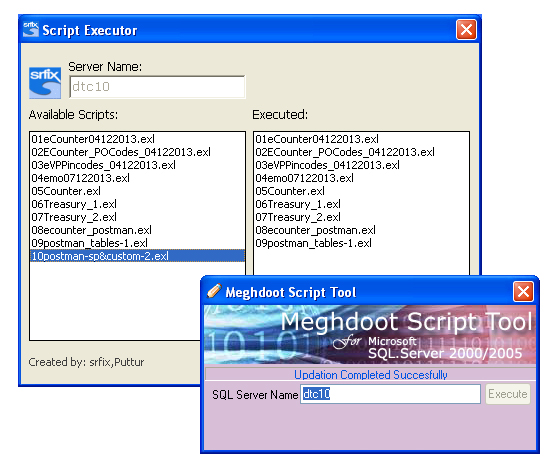


 Step:1.Download Scripts.zip.This contains all script files and Script tool by PTC Mysore.Upgrade the databases by these script files using Script Tool.