Showing posts with label R NET. Show all posts

Tuesday, 2 December 2014

R NET COMMUNICATION ROOT ELEMENT IS MISSING

Root Element Is Missing : R Net Communication

R Net Communication configuration file may corrupt due to HDD issues or System may Suddenly down. while execute R Net Communication 
While Click on OK. Additional error may Show like below
Unhandled exception has occurred in your application. If you click continue the application will ignore this error and attempt to continue. If you click Quit,the application will close immediately.
Root element is missing

Solution

  • Download Configuration file generator.
  • Enter SQL Server name and Point of Sale Server Path.
  • Select R Net Communication path to Generate Config File on same location.

Download

Saturday, 19 July 2014

R NET COMMUNICATION 4.0 INVALID COLUMN NAME 'MOBILE'

R Net Communication V4.0 Issues

Version  :  R Net Communication v4.0
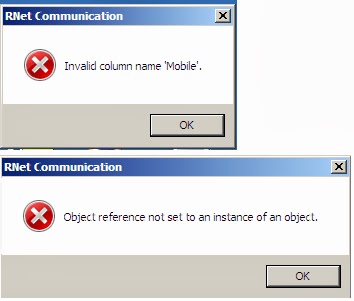
Issues    :  Invalid Column Name Mobile.
Solution :  I have used CEPT exl with PT Mobile Fix

Error Preview

Description

In Some Post office after execute R Net Communication v4.0 it shows an error Message as Invalid column name 'Mobile'.
It shows every seconds and not able to transmit / receive files and also not receive office / hub master for despatch Due bag Updation.

Solution:

 Download and Extract PT Mobile Fix from PoTools.

Download

Mirror 1


Google Drive

Download Link updated on 18.07.2014 0900hrs

Mirror 2

Box

Friday, 21 March 2014

R NET COMMUNICATION 4.0 UNZIPPING ISSUES AND SOLUTION

Issues

While Execute R Net Communication 4.0 it shows an error message as

1) "Error converting data type varchar to int",
2)"object reference not set to an instance of an object",

3) "The process cannot access the file because it is being used by another process"  

Solution

  1. Inside DATA folder of RXD please remove this file   S00000000000P67358100000301113103846SSS01104.gsq (example)
  2. Execute Rnet communication.

the above file mentioned is just for example. that file may be corrupted / contains invalid characters.

Try to find out corrupted file / otherwise take up this issue with CEPT through HDMS and attach R Net Communication Folder.

R NET COMMUNICATION V4.0 REVISED VERSION BY CEPT

R Net Communication Revised Version 4.0 Released By CEPT

After update the latest patches for COD Issues like Postman, Ecounter database Updation, Despatch String / Binary data truncated issues, R Net Communication shows some error.
 

Issues Listed below:

1) Error converting data type varchar to int
2) Object reference not set to an instance of an object
3) The process cannot access the file because it is being used by another process
4) String or binary data would be truncated.

Solution

  1. All those issues has been taken up to CEPT Mysore.
  2. They Provide Revised R Net Communication v4.0 for Post Offce.

Download

Download

Monday, 2 September 2013

RNet Communication error and solution after Update 8 to MM 7.0 - reg

     While executing Rnet Communication, we are getting the following errors:

1. Invalid column name Mobile

2. Object Reference Not set to an Instance of Object.

(Note: After MM 8.0 update)

Solution from CEPT,Mysore:

Download  the exl file  and update thro Script Tool. After executing the exl file, the above mentioned errors get rectified.

Via:

Saravanan R, 
Sys Admin, TN

Friday, 12 April 2013

RNet Version 2.1 (For CRCs and BPCs) Released on 09/04/2013


The RNet application which has been developed based on the earlier CRC Application has been released on 22.07.2011.  Subsequently, MNOP concept has been implemented for Registered Articles/Bags.  During the implementation of RNet applicationand MNOP concept, suggestions have been received from various CRCs/Divisions/R.O.s/Circles for enhancement of the options available in RNetapplication. The suggestions approved by Mails Division of the Directorate (which are mentioned in detail later in this document) have been incorporated in RNet application.
Further few suggestions have been received to optimize the usage of Despatch module for the purpose of BPCs and MBCs and these changes approved by Directorate are also incorporated in the Despatch module to be implemented in BPCs and MBCs.  
Hence this release.

Wednesday, 4 April 2012

R Net Communication error......................


Dear Friends,
            It is observe that usually Rnet communication stop work without any error due to creation of temp file in communication, hence I had attached one batch file to delete that particular temp file and runninc R net Communication regularly.
            Download  attached Rnet.ba file and rename as Rnet.bat and keep this file in start up where Rnet communication installed. also attached screen shot to keep batch file in startup.


Download


Coutesy:From,
P.M.Sabuwala,
System Manager,
Ahmedabad City Division,
Ahmedabad , Gujarat.
Mob : +91 99256 14129,
         +91 94293 55884.

Tuesday, 21 February 2012

solution for R net Communication Error HTTP IS not registered


Do the following steps to rectify this problem

1. Go to the folder C:\windows\System32\drivers\etc ( if you have installed windows on D partition  then the path will be like D:\windows\System32\drivers\etc)

2. Open the file “Hosts” file using notepad

3. There will be an entry like the following inside the hosts file
 127.0.0.1       localhost

 Add one more entry below.
 218.248.43.143 regnnet.ptcmysore.gov.in
 
-
With Regards

                                                      Help Desk
                                                      Center for Excellence in Postal Technology 
                                                      Postal Training Center Campus
                                                      Mysore 570010
                                                      Karnataka , India

Friday, 30 December 2011

RList Software for Divisional Offices.


RList - Tool for bulk booking of RLs and generation of text file for uploading to Despatch 7.2 module as well as distribution of RLs received to the various branches in DO.

Click below button to download complete setup (11.5 MB).


Click below button to download portable RList(102 KB).
For comments, feedback, problems if any pl contact: srputtur@gmail.com, 09449012470

Friday, 23 December 2011

Frequently Asked Questions About RNet

About RNet

What is R Net?
R Net is an Add on to existing process of delivering Registered Articles. Where articles will be booked with Barcodes and tracking details will be provided to customer as in case of Speed Articles.


Only few dates my office shown under R Net enabled offices?
R Net enabled offices MIS is depends on following points
1 That Day your office might have not communicated to Server through R Net Communication application.
2 That day your office have not used Barcodes for booking or
3 Check Next FAQ Point.


My Office is not available / reflecting on R Net Enabled Office MIS?
Check one of the following point

* Local Meghdoot Applications Pincode and Non Delivery Code is matching with R Net Central server master data.
* Once Articles are fetched in Despatch application for Bag Closing. Booked articles will reflect in R Net MIS.
* Check R Net Communication is running.
* Your Office may not be Using Barcodes for Booking.
* If Point of Sale installed for Speed Post then your office booking data will not reflect on R Net MIS so follow the steps given below
1 Login to Point of Sale Supervisor
2 Select menu My Office -> Environment
3 Change Office Type as Post Office
4 Restart Computer where R Net Communication is installed.
* If all of the above points are satisfactory. Please give a request for Office Master, upload it and restart R Net Communication.


How Post Office will configure Due Bags?
For Post Offices Due Bag configuration has to be done by concern System Administrator locally in Despatch module. If any office is not available for Bag Configuration follow the steps given below

1 Give a request for Office Master from R Net communication and then check if still office is not available for Bag Configuration follow step 2
2 Office Master verification from concern division either haven't mentioned that office or verified data itself is not received to CEPT.


How RMS Office will configure Due Bags (Due Mail List)?
For RMS offices concern Divisional SA will do the Due Bag configuration on Website using CRC Web Users supplied by CEPT If any office is not available for Bag Configuration follow the steps given below

1 Give a request for Office Master from R Net communication and then check if still office is not available for Bag Configuration follow step 2
2 Office Master verification from concern division either haven't mentioned that office or verified data itself is not received to CEPT.


Which office needs to be upgraded under R Net?
* All computerised Post Offices.
* Registration Centre of RMS sorting offices.


What are pre-requisites for R Net?
* Use of Barcode for all kind of Registered Articles in Booking offices.
* Barcode Scanner.
* Internet Connectivity to concern office.


What is Article Barcode format?
Example: RM42462921IN


What is Bag Barcode format?
Example: RMB0000000005


How to Know the R Net enabled Offices?
* Login R Net MIS url with common credentials
* Select R Net Enabled offices menu
* Provide your Circle / Region / Division details and view report.


What are benefits of R Net?
* Know the current status of Register article on Internet.
* Reduce the no of Search Bill for Register articles.
* Direct approach for customer complaints to the last destination office in tracking details.


Which Meghdoot Version onwards R Net started?
Meghdoot Millenium 7.0


Which Meghdoot application has to be upgraded in R Net implementation?
* Point of Sale
* Despatch
* Postman


Which URL shall we use for R Net MIS?
R Net MIS web site (URL) is as follows
https://services.ptcmysore.gov.in/RNet


What are the Login credentials for R Net MIS web application?
User ID : dop
Password : india


What is Installation Sequence for R Net?
* Post Office
- Upgrade / Install Point of Sale
- Upgrade / Install Postman
- Install R Net Communication
- Register the Certificate for R Net Communication
- Configure R Net Communication path in POS-Despatch and Postman application

* Sorting Office
- Install R Net Client
- Install R Net Communication
- Register the Certificate for R Net Communication
- Configure R Net Communication path in R Net Client


General Instructions:
* Non Delivery code in all the Meghdoot application should be configured same. And it should match with R Net Office master data on web.

* Keep R Net Communication always running it will help for Virtual Messages flow for next office.

* Two delivery offices with Same Pincode should not have the same Non Delivery code.
For example: Following configuration is not correct. Non delivery codes should be different.