

| World Postal History | |||
| 1840 | May 06: First Postage Stamp in the world Penny Black issued | ||
| 1874 | October 09: GPU (General Postal Union, the association before | ||
| introduction of UPU) was established in Berne | |||
| 1994 | e-mail was introduced | ||
| Indian Postal History | |||
| 16th Cen | Mughal Emperor Akbar (Regime 1556-1605 AD) is credited with | ||
| organising an efficient system of despach using horses and camels | |||
| 1672 | South Indian Ruler Raja Chikkadeva of Mysore organised a regular | ||
| postal service throughout his dominion. | |||
| 1688 | First Post Office established in India by the British East India | ||
| Company- Only official mail were transacted. | |||
Friday, 9 March 2012
POSTAL HISTORY
Thursday, 8 March 2012
POSTAL ABBREVIATIONS

56 APO | 1st CBPO |
99 APO | 2nd CBPO |
APO | Army Post Office |
APPU | Asian Pacific Postal Union |
AMPC | Automatic Mail Processing Centre |
CBPO | Centrally Based Post office |
CPMG | Chief Postmaster General |
CO | Circle Office |
CSD | Circle Stamps Depot |
CRC | Computerized Registration Centre |
ECS | Electronic Clearance Service |
EFT | Electronic Fund Transfer |
eMO | electronic Money Order |
ePOST | electronic Post |
PROCEDURE FOR ENTERING BOOKED AND DELIVERED INTERNATIONAL ARTILCES IN IPSWEB


Supplementary Dates Configuration in SubAccounts

During March While doing day begin in Sub accounts module a message appears. Most of the spms and supervisor firstly just ignore the message. The message is about configuring the Last working day of the March and First working day of April. If you ignore the message while day begin of next day this message also reappears.
The solution for this error is
Log in as ---Supervisor
---Go to configuration
Select Supplementary Dates--
Current Year 2012
Last working day of March 31-03-2012
First Working day of April 02-04-2012
This will solve the error
via-saparavur
How to disable error reporting in Internet exlporer

Error in Internet Explorer
Error Reporting is on by default in Windows XP ProfessionalService Pack 1. The service gives Microsoft the ability to track and address errors relating to the operating system, components, and applications. The ideabehind the service was that Microsoft would be able to track down bugs and fixthem more efficiently and quickly.
Many users do not need or want to take advantage of thisfeature and would like to turn it off. Many of these users are concerned aboutwhat information is being passed on to Microsoft and about their privacy. Otherusers are just annoyed at how often they see the screen (Figure A) that asks them to submit the bug through the ErrorReporting service.VAXenGuy discovered. If you still get error messages afterdisabling Error Reporting, especially dubious ones, you could disable theservice with a Windows Registry edit.
Solution 1
The controls to turn off or customize Windows ErrorReporting reside in System Settings, located in the Control Panel. (You canalso right-click My Computer and select Properties.) In the System Settingsdialog box, select the Advanced tab and then click the Error Reporting buttonto reveal the Error Reporting dialog box shown in Figure B.
Error Reporting configuration

From this dialog box, you can disable Error Reporting orcustomize it to work only on certain programs and/or Windows components.
Once you've disabled Error Reporting, you might as welldisable the service entirely, which you can do through Administrative Tools inthe Control Panel. Double-click on Services from the Administrative Toolsdialog box, scroll down to the Error Reporting entry, and double-click it. Fromthis dialog box, you can stop the service or restart it if you turned if offbefore.
Solution 2
Apparently, even disabling Error Reporting through theconventional means may not be enough, as
Open the Windows Registry with your favorite editor andnavigate to this key:
HKEY_LOCAL_MACHINE\SOFTWARE\Microsoft\PCHealth\ErrorReporting
To disable ErrorHow to work in google chrome invisibly?
Google chrome provides a option called "incognito"
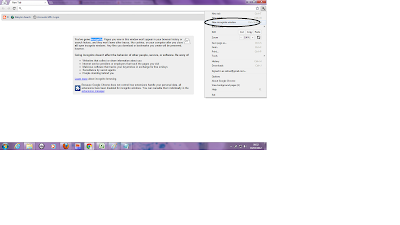 Pages you view in this window won't appear in your browser history or search history, and they won't leave other traces, like cookies, on your computer after you close all open incognito windows. Any files you download or bookmarks you create will be preserved, however.
Going incognito doesn't affect the behavior of other people, servers, or software. Be wary of:
Websites that collect or share information about you
Internet service providers or employers that track the pages you visit
Malicious software that tracks your keystrokes in exchange for free smileys
Surveillance by secret agents
People standing behind you
via-satirur
 Pages you view in this window won't appear in your browser history or search history, and they won't leave other traces, like cookies, on your computer after you close all open incognito windows. Any files you download or bookmarks you create will be preserved, however.
Going incognito doesn't affect the behavior of other people, servers, or software. Be wary of:
Websites that collect or share information about you
Internet service providers or employers that track the pages you visit
Malicious software that tracks your keystrokes in exchange for free smileys
Surveillance by secret agents
People standing behind you
via-satirur
Subscribe to:
Posts (Atom)


