

Monday, 2 September 2013
SIFY Network - Limits Internet Access in Post offices which is Migrated with CBS(Sify Network)
Approved and Accessible Sites through SIFY Network:
All links Under India Post:
https://services.ptcmysore.gov.in/Speednet/
https://services.ptcmysore.gov.in/RNet
https://services.ptcmysore.gov.in/emo
https://services.ptcmysore.gov.in/uidreports/
https://services.ptcmysore.gov.in/AccountsMIS/
http://indiapostarrow.gov.in/arrow/default.asp
http://www.indiapost.gov.in/RuralInfrastructure/
http://ptcinfo.org/eiodweb/
http://www.indiapost.gov.in/ccc/
http://www.ptcinfo.org/DigiFrank/
http://www.ptcinfo.org/eurogiro/
https://services.ptcmysore.gov.in/spc/
https://www.epostoffice.gov.in/
http://indiapost.nic.in/
https://mail.gov.in/iwc_static/layout/new_login.jsp
http://www.indiapost.gov.in/SpeedPost.aspx
http://www.indiapost.gov.in/ExpressParcel.aspx
http://www.indiapost.gov.in/IMOS.aspx
http://www.indiapost.gov.in/BusinessPost.aspx
http://ipsweb.ptcmysore.gov.in/ipswebtracking/
http://services.ptcmysore.gov.in/Speednettracking/Track/UIDTrack.aspx
https://wupos.westernunion.com/agent-app/login
http://www.reliancegold.in/jsp/userLogin.jsp
https://services.dopmobile.in/MerchantApp/
http://mail.nic.in
SDC Chennai:
tamilnadupost.nic.in/sdc/index.htm
Private Sites:
www.google.com
www.yahoo.com
All other Sites were blocked by SIFY Network as per DOP Order.
Source : http://potools.blogspot.in/
All links Under India Post:
https://services.ptcmysore.gov.in/Speednet/
https://services.ptcmysore.gov.in/RNet
https://services.ptcmysore.gov.in/emo
https://services.ptcmysore.gov.in/uidreports/
https://services.ptcmysore.gov.in/AccountsMIS/
http://indiapostarrow.gov.in/arrow/default.asp
http://www.indiapost.gov.in/RuralInfrastructure/
http://ptcinfo.org/eiodweb/
http://www.indiapost.gov.in/ccc/
http://www.ptcinfo.org/DigiFrank/
http://www.ptcinfo.org/eurogiro/
https://services.ptcmysore.gov.in/spc/
https://www.epostoffice.gov.in/
http://indiapost.nic.in/
https://mail.gov.in/iwc_static/layout/new_login.jsp
http://www.indiapost.gov.in/SpeedPost.aspx
http://www.indiapost.gov.in/ExpressParcel.aspx
http://www.indiapost.gov.in/IMOS.aspx
http://www.indiapost.gov.in/BusinessPost.aspx
http://ipsweb.ptcmysore.gov.in/ipswebtracking/
http://services.ptcmysore.gov.in/Speednettracking/Track/UIDTrack.aspx
https://wupos.westernunion.com/agent-app/login
http://www.reliancegold.in/jsp/userLogin.jsp
https://services.dopmobile.in/MerchantApp/
http://mail.nic.in
SDC Chennai:
tamilnadupost.nic.in/sdc/index.htm
Private Sites:
www.google.com
www.yahoo.com
All other Sites were blocked by SIFY Network as per DOP Order.
Source : http://potools.blogspot.in/
Speed Net 4.0 by CEPT Mysore
Speed Net 4.0 is a major release after the Speednet Version 3.1.2 Release dated 15.12.2011.
1. SpeedOne Installer.exe
2. Speednet Communication - setup.exe and Speednet Communication.msi
3. COD Features as per SOP dated 30042013.PPT
A) Pre-requisite:
1. Service Pack 1 or higher for windows 2003/XP
2. .Net 4.0 Client Profile setup 4.0 and Windows imaging component(wic.exe)
3. Speednet Version 3.1.2 Release dated 15.12.2011.
1. Copy the contents of Message, RXD and TXD folders under EMSClient folder to another location.
2. Uninstall the existing EMSClient and delete the original folders.
3. Restart the system.
4. Install Speednet Communication and replace the contents of Message, RXD and TXD folders to the new folders.
Note: Please take database backups before attempting Speednet Client upgradation.
1. Copy the SpeedOne Installer.exe to the machine having Speednet Client... preferably in the Speednet Client folder.
2. Run the SpeedOne Installer.exe and enter the path where the Speednet Client is installed.
Note: Speednet Client Path will be selected automatically,
if the SpeedOne Installer.exe is copied to the Speednet Client folder.
3. Follow the steps displayed. The upgradation process includes:
a) Upgrading Speednet databases viz., POSPCC and POSPCCBackup by executing the scripts using ScriptTool.exe.
b) Upgrading Speednet Server local databases by executing BNPLDataCorrection.exe.
c) Copying the 4 DLLs n Speednet.exe and then registering the 4 DLLs.
4. In case of any errors during the upgradation process, upgradation can be done manually by
a) Executing the scripts from \\DB Scripts folder using ScriptTool.exe.
The script tool available in the \\DB Scripts is a command-based utility and cannot be used for regular script executions.
b) Replacing 4 DLLs n Speednet.exe and then registering the 4 DLLs, from the \\Speednet Client folder.
c) Replacing BNPLDataCorrection.exe and TBNPL.snt files from the \\Speednet Client folder and running BNPLDataCorrection.exe.
1. Copy the contents of Message, RXD and TXD folders under EMSClient folder to another location.
2. Uninstall the existing EMSClient and delete the original folders.
3. Restart the system.
4. Install Speednet Communication and replace the contents of Message, RXD and TXD folders to the new folders.
Note: Please take database backups before attempting Speednet Client upgradation.
1. Copy the SpeedOne Installer.exe to the machine having Speednet Client... preferably in the Speednet Client folder.
2. Run the SpeedOne Installer.exe and enter the path where the Speednet Client is installed.
Note: Speednet Client Path will be selected automatically,
if the SpeedOne Installer.exe is copied to the Speednet Client folder.
3. Follow the steps displayed. The upgradation process includes:
a) Upgrading Speednet databases viz., POSPCC and POSPCCBackup by executing the scripts using ScriptTool.exe.
b) Upgrading Speednet Server local databases by executing BNPLDataCorrection.exe.
c) Copying the 4 DLLs n Speednet.exe and then registering the 4 DLLs.
4. In case of any errors during the upgradation process, upgradation can be done manually by
a) Executing the scripts from \\DB Scripts folder using ScriptTool.exe.
The script tool available in the \\DB Scripts is a command-based utility and cannot be used for regular script executions.
b) Replacing 4 DLLs n Speednet.exe and then registering the 4 DLLs, from the \\Speednet Client folder.
c) Replacing BNPLDataCorrection.exe and TBNPL.snt files from the \\Speednet Client folder and running BNPLDataCorrection.exe.
Source : http://potools.blogspot.in
The contents for Speednet 4.0 release are:
1. SpeedOne Installer.exe
2. Speednet Communication - setup.exe and Speednet Communication.msi
3. COD Features as per SOP dated 30042013.PPT
A) Pre-requisite:
1. Service Pack 1 or higher for windows 2003/XP
2. .Net 4.0 Client Profile setup 4.0 and Windows imaging component(wic.exe)
3. Speednet Version 3.1.2 Release dated 15.12.2011.
B) New Installation for Speednet Communication:
1. Copy the contents of Message, RXD and TXD folders under EMSClient folder to another location.
2. Uninstall the existing EMSClient and delete the original folders.
3. Restart the system.
4. Install Speednet Communication and replace the contents of Message, RXD and TXD folders to the new folders.
C) Speednet Client Upgradation :
Note: Please take database backups before attempting Speednet Client upgradation.
1. Copy the SpeedOne Installer.exe to the machine having Speednet Client... preferably in the Speednet Client folder.
2. Run the SpeedOne Installer.exe and enter the path where the Speednet Client is installed.
Note: Speednet Client Path will be selected automatically,
if the SpeedOne Installer.exe is copied to the Speednet Client folder.
3. Follow the steps displayed. The upgradation process includes:
a) Upgrading Speednet databases viz., POSPCC and POSPCCBackup by executing the scripts using ScriptTool.exe.
b) Upgrading Speednet Server local databases by executing BNPLDataCorrection.exe.
c) Copying the 4 DLLs n Speednet.exe and then registering the 4 DLLs.
4. In case of any errors during the upgradation process, upgradation can be done manually by
a) Executing the scripts from \\DB Scripts folder using ScriptTool.exe.
The script tool available in the \\DB Scripts is a command-based utility and cannot be used for regular script executions.
b) Replacing 4 DLLs n Speednet.exe and then registering the 4 DLLs, from the \\Speednet Client folder.
c) Replacing BNPLDataCorrection.exe and TBNPL.snt files from the \\Speednet Client folder and running BNPLDataCorrection.exe.
B) New Installation for Speednet Communication:
1. Copy the contents of Message, RXD and TXD folders under EMSClient folder to another location.
2. Uninstall the existing EMSClient and delete the original folders.
3. Restart the system.
4. Install Speednet Communication and replace the contents of Message, RXD and TXD folders to the new folders.
C) Speednet Client Upgradation :
Note: Please take database backups before attempting Speednet Client upgradation.
1. Copy the SpeedOne Installer.exe to the machine having Speednet Client... preferably in the Speednet Client folder.
2. Run the SpeedOne Installer.exe and enter the path where the Speednet Client is installed.
Note: Speednet Client Path will be selected automatically,
if the SpeedOne Installer.exe is copied to the Speednet Client folder.
3. Follow the steps displayed. The upgradation process includes:
a) Upgrading Speednet databases viz., POSPCC and POSPCCBackup by executing the scripts using ScriptTool.exe.
b) Upgrading Speednet Server local databases by executing BNPLDataCorrection.exe.
c) Copying the 4 DLLs n Speednet.exe and then registering the 4 DLLs.
4. In case of any errors during the upgradation process, upgradation can be done manually by
a) Executing the scripts from \\DB Scripts folder using ScriptTool.exe.
The script tool available in the \\DB Scripts is a command-based utility and cannot be used for regular script executions.
b) Replacing 4 DLLs n Speednet.exe and then registering the 4 DLLs, from the \\Speednet Client folder.
c) Replacing BNPLDataCorrection.exe and TBNPL.snt files from the \\Speednet Client folder and running BNPLDataCorrection.exe.
Source : http://potools.blogspot.in
RNet Communication error and solution after Update 8 to MM 7.0 - reg
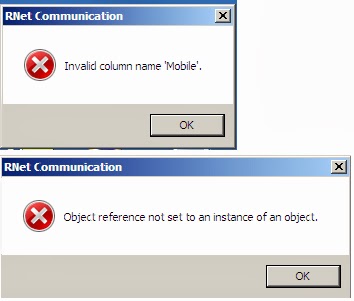
While executing Rnet Communication, we are getting the following errors:
1. Invalid column name Mobile
2. Object Reference Not set to an Instance of Object.
(Note: After MM 8.0 update)
Solution from CEPT,Mysore:
Download the exl file and update thro Script Tool. After executing the exl file, the above mentioned errors get rectified.
Via:
Saravanan R,
Sys Admin, TN
PENSION ARREARS FROM 01.01.2006 AS PER COURT ORDER: GOVERNMENT REPLY IN PARLIAMENT
The orders for implementation of the decision taken by the Government on the
recommendations of 6th CPC for revision for pension of past pensioners were
issued vide this Department’s OM No.38/37/08-P&PW (A) dated 1.9.2008. The
provisions of Para 4.2 of this OM were clarified vide this Department’s letter
dated 3.10.2008.
The Central Administrative Tribunal, Principal Bench, New Delhi in
its order dated 1.11.2011 observed that by the OM dated 3.10.2008 the
original orders of 1.9.2008 have been modified. Hon’ble CAT directed that the
past pensioners may be granted, w.e.f. 1.1.2006, a minimum pension @
50% of the minimum pay corresponding to the pre-revised pay
scale with reference to the fitment table applicable for revision of pay
of serving employees.
A
Writ Petition was filed in the Hon’ble High Court of Delhi
challenging the above mentioned order. In its order dated 29.4.2013, the Hon’ble Delhi High Court has upheld
the order dated 1.11.2011. After considering the order of
Hon’ble High Court of Delhi and various representations received in
this regard, Special Leave Petition was filed by the Department of Pension
and Pensioners’ Welfare in the Hon’ble Supreme Court of
India.
This SLP came up for hearing recently on
29.7.2013 before the Hon. Supreme Court and has been dismissed.
The above information submitted by Min of Personnel, Public Grievances &
Pensions in reply of undermentioned Lok Sabha Question:-
GOVERNMENT OF INDIA
MINISTRY OF
PERSONNEL,PUBLIC GRIEVANCES AND PENSIONS
LOK SABHA
UNSTARRED QUESTION
NO 670
ANSWERED ON 07.08.2013
DELAY IN PAYMENT OF ARREARS
TO PENSIONERS
670 . Shri VILAS BABURAO MUTTEMWAR
Will the Minister of PERSONNEL,PUBLIC
GRIEVANCES AND PENSIONS be pleased to state:-
(a) the reasons for inordinate
delay in implementation of Hon`ble High Court`s order to give effect to
the payment of arrears w.e.f. 01.01.2006 to pensioners retired before
2006;
(b) whether the Government have received
representations from employees organizations and other bodies in this regard;
and
(c) if so, the details thereof and
the reaction of the Government on the representations?
ANSWER
Minister of State in the
Ministry of Personnel, Public Grievances and Pensions and Minister of State in
the Prime Minister’s Office. (SHRI V. NARAYANASAMY)
(a) to (c): *** see above ***
Subscribe to:
Posts (Atom)


